 BleepCut
Bleep profanity
in video and audio
Select words in the transcript, listen to the result and save your file
Coming to the App Store
Your recordings aren’t sent to a server
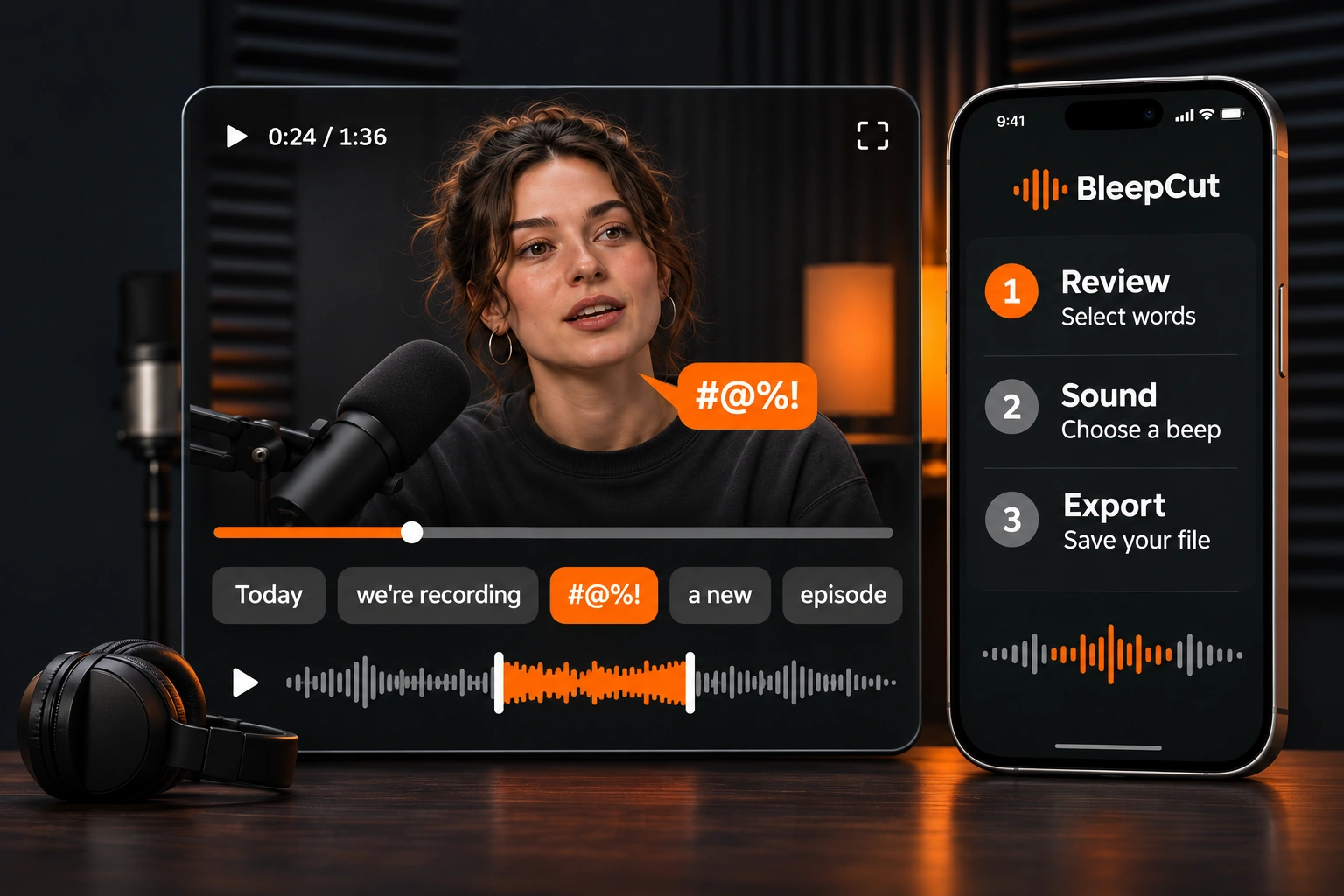
Import
Add video from Photos or video and audio from Files
Select words
Mark the words or phrases you want to bleep in the transcript
Save
Choose a sound, listen to the result and save your edited file
Listen to the censor sounds
Couldn’t play the sound — please try again
Audio and transcripts
stay on your iPhone
- No recording uploads
- No account
Free
- Files up to 60 seconds
- One new project per day
- Classic beep
- Video up to 1080p
Pro
- Five additional censor sounds
- Silence and audio-only cuts
- Custom words and presets
- Files up to 10 minutes and 1 GB
Monthly
$3.99Purchase in the app
Yearly
$19.99Purchase in the app
Lifetime
$49.99Purchase in the app
US prices in USD — the app shows the final price and currency before purchase
Monthly and yearly plans renew automatically — Lifetime is a one-time purchase
Common questions
Where are my audio and video processed?
Recognition and editing run on your iPhone with the included model — recordings and transcripts aren’t uploaded to a server
What is included for free?
One new exported project per day, files up to 60 seconds, the classic beep and video up to 1080p — exporting that project again on the same day doesn’t use another quota